Vite + React + Ashel M3 Kit
Почему
Может быть так, что вам не нужен весь богатый функционал Next.js. Допустим вам нужен просто фронт без серверной части, или, допустим, она уже у вас есть. В данном случае идеальным будет использование сборщика Vite.
Установка
Создадим основу будущего приложения
yarn create vite m3-react-app --template react-ts
Далее установим TailwindCSS.
Подробное описание установки можно посмотреть на официальном сайте.
Установим дополнительные зависимости:
yarn add class-variance-authority clsx tailwind-merge
Создадим helper функцию cn для работы с css классами в файл src/utils/classNames.ts:
import { ClassValue, clsx } from "clsx"import { twMerge } from "tailwind-merge"export const cn = (...inputs: ClassValue[]) => {return twMerge(clsx(inputs))}
Многие реализованные компоненты используют данную функцию. Она будет помогать нам условно добавлять tailwind классы к элементам.
Загружаем цвета
Подробная установка цветовой палитры описана на данной странице.
Сейчас же можете просто скопировать данный tailwind.config.js файл.
/** @type {import('tailwindcss').Config} */module.exports = {darkMode: 'class',content: ["./src/**/*.{js,ts,jsx,tsx}"],theme: {extend: {boxShadow: {elevation1: '0 1px 2px 0 rgba(0,0,0,0.3), 0 1px 3px 1px rgba(0,0,0,0.15)',elevation2: '0 1px 2px 0 rgba(0,0,0,0.3), 0 2px 6px 2px rgba(0,0,0,0.15)',elevation3: '0 1px 3px 0 rgba(0,0,0,0.3), 0 4px 8px 3px rgba(0,0,0,0.15)',elevation4: '0 2px 3px 0 rgba(0,0,0,0.3), 0 6px 10px 4px rgba(0,0,0,0.15)',elevation5: '0 4px 4px 0 rgba(0,0,0,0.3), 0 8px 12px 6px rgba(0,0,0,0.15)',},colors: {"light": {"primary": "#6750A4","onPrimary": "#FFFFFF","primaryContainer": "#EADDFF","onPrimaryContainer": "#21005D","primaryFixed": "#EADDFF","onPrimaryFixed": "#21005D","primaryFixedDim": "#D0BCFF","onPrimaryFixedVariant": "#4F378B","secondary": "#625B71","onSecondary": "#FFFFFF","secondaryContainer": "#E8DEF8","onSecondaryContainer": "#1D192B","secondaryFixed": "#E8DEF8","onSecondaryFixed": "#1D192B","secondaryFixedDim": "#CCC2DC","onSecondaryFixedVariant": "#4A4458","tertiary": "#7D5260","onTertiary": "#FFFFFF","tertiaryContainer": "#FFD8E4","onTertiaryContainer": "#31111D","tertiaryFixed": "#FFD8E4","onTertiaryFixed": "#31111D","tertiaryFixedDim": "#EFB8C8","onTertiaryFixedVariant": "#633B48","error": "#B3261E","onError": "#FFFFFF","errorContainer": "#F9DEDC","onErrorContainer": "#410E0B","outline": "#79747E","background": "#FEF7FF","onBackground": "#1D1B20","surface": "#FEF7FF","onSurface": "#1D1B20","surfaceVariant": "#E7E0EC","onSurfaceVariant": "#49454F","inverseSurface": "#322F35","inverseOnSurface": "#F5EFF7","inversePrimary": "#D0BCFF","shadow": "#000000","surfaceTint": "#6750A4","outlineVariant": "#CAC4D0","scrim": "#000000","surfaceContainerHighest": "#E6E0E9","surfaceContainerHigh": "#ECE6F0","surfaceContainer": "#F3EDF7","surfaceContainerLow": "#F7F2FA","surfaceContainerLowest": "#FFFFFF","surfaceBright": "#FEF7FF","surfaceDim": "#DED8E1"},"dark": {"primary": "#D0BCFF","onPrimary": "#381E72","primaryContainer": "#4F378B","onPrimaryContainer": "#EADDFF","primaryFixed": "#EADDFF","onPrimaryFixed": "#21005D","primaryFixedDim": "#D0BCFF","onPrimaryFixedVariant": "#4F378B","secondary": "#CCC2DC","onSecondary": "#332D41","secondaryContainer": "#4A4458","onSecondaryContainer": "#E8DEF8","secondaryFixed": "#E8DEF8","onSecondaryFixed": "#1D192B","secondaryFixedDim": "#CCC2DC","onSecondaryFixedVariant": "#4A4458","tertiary": "#EFB8C8","onTertiary": "#492532","tertiaryContainer": "#633B48","onTertiaryContainer": "#FFD8E4","tertiaryFixed": "#FFD8E4","onTertiaryFixed": "#31111D","tertiaryFixedDim": "#EFB8C8","onTertiaryFixedVariant": "#633B48","error": "#F2B8B5","onError": "#601410","errorContainer": "#8C1D18","onErrorContainer": "#F9DEDC","outline": "#938F99","background": "#141218","onBackground": "#E6E0E9","surface": "#141218","onSurface": "#E6E0E9","surfaceVariant": "#49454F","onSurfaceVariant": "#CAC4D0","inverseSurface": "#E6E0E9","inverseOnSurface": "#322F35","inversePrimary": "#6750A4","shadow": "#000000","surfaceTint": "#D0BCFF","outlineVariant": "#49454F","scrim": "#000000","surfaceContainerHighest": "#36343B","surfaceContainerHigh": "#2B2930","surfaceContainer": "#211F26","surfaceContainerLow": "#1D1B20","surfaceContainerLowest": "#0F0D13","surfaceBright": "#3B383E","surfaceDim": "#141218"}}},},plugins: [],}
Настроим path-alias
Все файлы Ashel M3 Kit используют path-alias (символ @). Это необходимо для того, чтобы при импорте файла вместо ../../src/shared/ui/Button было @/shared/ui/Button.
Если вам не так необходима данная функция, можете пропустить секцию. Учтите, что вам придётся переписывать импорты во всех файлах, которые вы скопируете.
yarn add -D @types/node
Изменим vite.config.ts:
import { defineConfig } from 'vite'import react from '@vitejs/plugin-react'import * as path from 'path'export default defineConfig({plugins: [react()],resolve: {alias: [{ find: '@', replacement: path.resolve(__dirname, 'src') }],},})
Далее сообщим непосредственно самому typescript, что мы используем path-alias. Измените ваш tsconfig.json:
{"compilerOptions": {"target": "ESNext","lib": ["DOM", "DOM.Iterable", "ESNext"],"module": "ESNext","skipLibCheck": true,/* Bundler mode */"moduleResolution": "bundler","allowImportingTsExtensions": true,"resolveJsonModule": true,"isolatedModules": true,"noEmit": true,"jsx": "react-jsx",/* Linting */"strict": true,"noUnusedLocals": true,"noUnusedParameters": true,"noFallthroughCasesInSwitch": true,/* Path alias */"paths": {"@/*": ["./src/*"]}},"include": ["src"],"references": [{ "path": "./tsconfig.node.json" }]}
Далее скопируем в нашу директорию первый UI компонент - кнопку. Разместите файл по пути src/shared/ui/Button.tsx.
import React from "react"import { cva, type VariantProps } from "class-variance-authority"import Label from "@/components/typography/Label"import UIStateLayer from "@/components/ui/UIStateLayer"import { cn } from "@/utils/classNames"const buttonVariants = cva("group h-10 rounded-full w-fit disabled:bg-opacity-[0.12] disabled:cursor-not-allowed disabled:shadow-none disabled:text-onSurface disabled:text-opacity-[0.38] transition-shadow",{variants: {appearance: {elevated:"bg-surfaceContainerLow shadow-elevation1 disabled:bg-primary hover:shadow-elevation2 active:shadow-elevation1 text-primary",filled:"bg-primary disabled:bg-onSurface hover:shadow-elevation1 active:shadow-none text-onPrimary",tonal:"bg-secondaryContainer disabled:bg-onSurface hover:shadow-elevation1 active:shadow-none text-onSecondaryContainer",outlined:"border border-outline disabled:border-onSurface disabled:border-opacity-[0.12] text-primary",text: "text-primary",},},defaultVariants: {},})// Для стилей State Layer// (Необходим, так как Button и State Layer в разных состояниях имеют разные свойства background)const uiStateLayerVariants = cva("rounded-full flex items-center gap-2 px-6", {variants: {appearance: {elevated: "bg-primary",filled: "bg-onPrimary",tonal: "bg-onSecondaryContainer",outlined: "bg-primary",text: "bg-primary px-3",},},})interface Propsextends React.ButtonHTMLAttributes<HTMLButtonElement>,Required<Pick<VariantProps<typeof buttonVariants>, "appearance">> {icon?: React.ReactNode}const Button = React.forwardRef<HTMLButtonElement, Props>(({ icon, children, className, appearance, ...props }, forwardedRef) => {return (<buttonclassName={cn(className, buttonVariants({ appearance }))}{...props}ref={forwardedRef}><UIStateLayerclassName={cn(uiStateLayerVariants({ appearance }),icon && "pl-4",icon && appearance === "text" && "pl-3 pr-4")}>{icon && <span>{icon}</span>}<Label size="large">{children}</Label></UIStateLayer></button>)})Button.displayName = "Button"export default Button
У неё есть два компонента-зависимости.
Label сохраните в src/shared/typography/Label.tsx, а UIStateLayer в src/shared/ui/UIStateLayer.tsx.
import { FC, HTMLAttributes } from "react"import { cva, type VariantProps } from "class-variance-authority"import { cn } from "@/utils/classNames"const labelVariants = cva("text-inherit",variants: {size: {large: "text-sm tracking-[0.1px] font-medium",medium: "text-xs tracking-[0.5px] font-medium",small: "text-[11px] leading-4 tracking-[0.5px] font-medium",},},defaultVariants: {size: "medium",},})interface Propsextends VariantProps<typeof labelVariants>,HTMLAttributes<HTMLHeadingElement> {}const Label: FC<Props> = ({ children, size, className, ...props }) => {return (<span className={cn(labelVariants({ size }), className)} {...props}>{children}</span>)}export default Label
import { FC, HTMLAttributes } from "react"import { cn } from "@/utils/classNames"const UIStateLayer: FC<HTMLAttributes<HTMLDivElement>> = ({children,className,}) => {return (<divclassName={cn("w-full h-full bg-opacity-0 group-hover:bg-opacity-[0.08] group-active:bg-opacity-[0.12] group-disabled:bg-opacity-0",className)}>{children}</div>)}export default UIStateLayer
Можем приступать непосредственно к написанию кода. Измените ваш файл src/App.tsx таким образом:
import { useEffect, useState } from "react"import Button from "./components/ui/Button"function App() {const [theme, setTheme] = useState<"light" | "dark">("light")useEffect(() => {if (window.matchMedia("(prefers-color-scheme: dark)").matches) {setTheme("dark")} else {setTheme("light")}}, [])useEffect(() => {if (theme === "dark") {document.documentElement.classList.add("dark")} else {document.documentElement.classList.remove("dark")}}, [theme])const toggleTheme = () => {setTheme(theme === "dark" ? "light" : "dark")}return (<div className="flex flex-col gap-6 justify-center items-center bg-surface w-screen h-screen"><h1 className="text-5xl font-semibold text-primary">My brand new Material 3 App!</h1><Button appearance="tonal" onClick={toggleTheme}>Change theme</Button></div>)}export default App
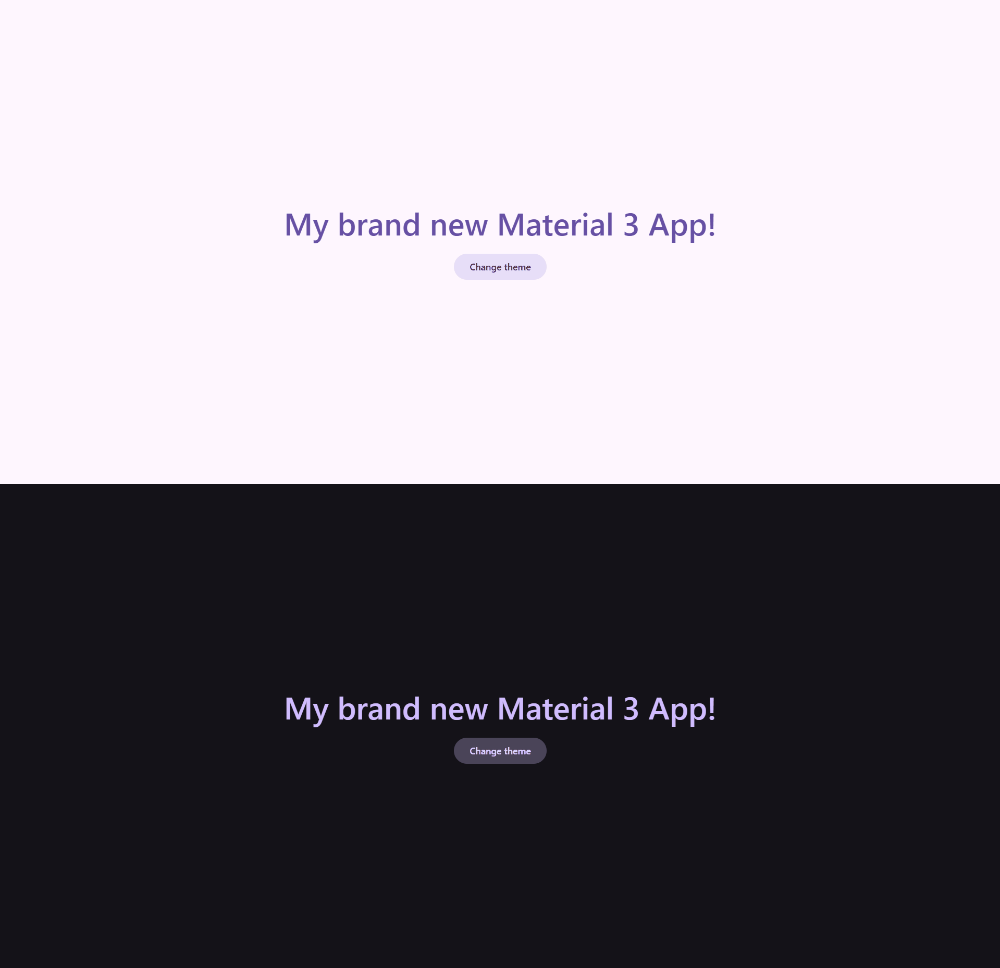
Поздравляю, вы создали приложение с готовой тёмной темой и компонентом-кнопкой, готовой к использованию, и всё это используя Vite.
Что дальше
Далее можете почитать о самом Material Design 3 на официальном сайте, чтобы понять основные принципы дизайн системы. После чего возвращайтесь сюда и импортируйте в свой проект компоненты, которые вам необходимы.